
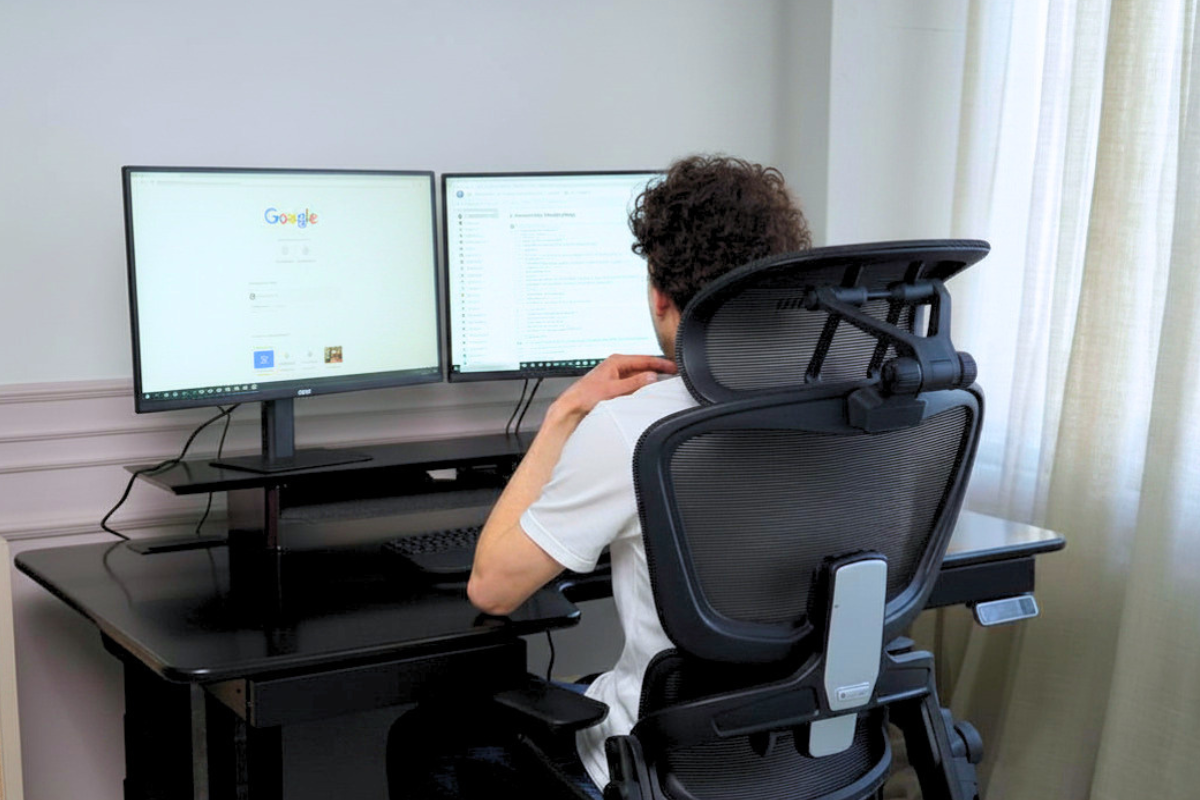
In short: an ergonomic home workspace means the correct height for your desk and chair, a monitor at eye level, diffused, glare-free lighting, and minimal visual clutter on your desk. Plus, the main rule: change your body position every 40–45 minutes. Below, we explain how to set all this up without renovation or room remodeling.
Sometimes, the workday has just begun, the to-do list is clear, and motivation is high, but after just an hour, there's a desire to check the phone, make another coffee, or simply lie down. Many attribute this to fatigue or weak discipline. In practice, the reason is often much simpler: improper space organization.
An ergonomic home workspace helps maintain concentration, sustain energy levels, and reduce fatigue throughout the day. When your body is comfortable, your eyes aren't strained by poor lighting, and everything you need is at hand, even complex tasks become easier.
Why physical comfort directly impacts concentration
Attention is often perceived as a purely psychological process: if you want to, you focus. In reality, the brain constantly receives signals from the body. If muscles are tense, the back is tired, and the neck is stiff, a portion of resources is automatically spent processing these sensations, not on work.
That's why an uncomfortable chair or an improperly chosen desk significantly reduces productivity. People get distracted more often, make decisions slower, and tire more quickly — and may not even connect this to their workspace.
What most affects concentration:
- comfortable working surface height;
- chair with lumbar support;
- correct monitor placement;
- enough space for hands;
- absence of constant tension in the shoulders and neck;
- ability to change body position throughout the day.
These elements don't work in isolation but as a single system. Even small improvements in each of them combined yield significant results.
Correct computer posture: why fatigue appears after just a few hours
Even the most interesting work becomes more difficult if you sit in an uncomfortable position for several hours. The human body is not designed for prolonged static positions: when muscles remain tense for a long time, blood circulation worsens, a feeling of heaviness appears, and fatigue gradually accumulates.
Often, the problem only becomes noticeable in the second half of the day. The lower back starts to ache, tension appears in the shoulders, and you constantly want to change positions. It seems that the reason is a large workload, although in many cases, it's precisely about posture. If your lower back regularly reminds you of itself by lunchtime, it's a reason to pay attention to an ergonomic chair with lumbar support, not your own endurance.
Key principles of correct posture:
- feet flat on the floor or on a special footrest;
- knees bent at approximately a 90-degree angle;
- lower back has reliable support;
- shoulders remain relaxed;
- elbows are approximately at desk level;
- the top of the screen is approximately at eye level.
Please note: almost all these points depend on the height of the working surface. Achieving the correct elbow and shoulder position is easiest when the desk height adjusts to the person, not vice versa — this is precisely why a height-adjustable desk is designed. It also allows you to alternate between sitting and standing work: it's optimal to change body position every 40–45 minutes, so static load doesn't accumulate.
A separate point is the monitor. If the top of the screen is below eye level, your neck will be tilted all day. This can be resolved without replacing equipment: a monitor arm allows you to precisely adjust the height, tilt, and distance to your eyes, and at the same time frees up space on your desk.
Workspace, order, and the environment's impact on productivity
Even perfectly selected furniture won't save your concentration if your workspace is cluttered with papers, chargers, cups, and random items. Visual noise forces the brain to constantly switch attention between dozens of objects—even if you don't notice it.
A home environment inherently contains more distractions than an office, so space organization is especially important here. We're not talking about sterile emptiness: there can be documents, a diary, and items you use daily on your desk. The main thing is that every item has its place.
Wires usually create the most chaos. Desk cable management hides them under the tabletop, and the workspace immediately looks calmer, and cleaning takes minutes.
Workspace lighting: how light affects attention and fatigue
Lighting is one of the most underestimated factors in productivity. Everyone thinks about computers, chairs, and desks, but almost no one considers the quality of light. Yet, incorrect lighting often causes eye strain, headaches, and reduced efficiency.
A few practical rules:
- use diffused lighting without harsh shadows;
- avoid glare on the screen;
- do not place the monitor opposite a window;
- in the evening, add a local light source, and don't work only with the monitor;
- regularly clean the screen of dust.
Proper lighting doesn't require significant investment but noticeably extends the time you can work comfortably throughout the day.
How the work environment shapes habits
The brain quickly associates a place with an activity: in the bedroom, you want to rest; in the kitchen, you want to eat; at the desk, you want to work. When work happens in different parts of the apartment every day — on the couch today, at the dining table tomorrow — the brain has to reconfigure itself each time. This reduces the speed of engaging in work and increases distractions.
Even a small but permanent workspace helps you transition into work mode faster:
- use the workspace only for work or study;
- if possible, do not move your laptop to the couch or bed;
- start your workday consistently;
- end the day with a quick tidying of your desk;
- separate the work area from the rest area, at least visually.
If it's a single room and it's difficult to allocate a separate corner, a compact [custom-sized desk] may be the solution for a specific niche, windowsill, or room corner.
Most common mistakes when organizing a home workspace
- working in bed or on the couch;
- desk too low or too high;
- lack of a comfortable chair;
- poor lighting;
- constant clutter on the desk;
- workspace in a high-traffic area;
- no boundary between work and rest;
- prolonged sitting without breaks and changing body position.
Conclusion
High productivity rarely depends solely on willpower. Much more often, the result is determined by the conditions in which a person works daily. An ergonomic home workspace is a system: comfortable furniture, correct posture, quality lighting, and order. Together, these factors help maintain attention, reduce fatigue, and work comfortably regardless of profession.
Frequently Asked Questions
What should be the height of a desk for computer work? There is no universal number — the correct height depends on your height and body proportions: your elbows should be approximately at desk level at a 90-degree angle. For example, for a height of 177 cm, this is 69–70 cm, but the exact value is individual for everyone. A height-adjustable desk completely solves this problem: the height can be adjusted to the specific person with centimeter precision.
Is it beneficial to work standing all day? No. Prolonged standing is just as tiring as prolonged sitting. The benefit comes from alternation: changing body position every 40–45 minutes improves blood circulation and prevents static load from accumulating.
At what height should the monitor be? The top of the screen should be approximately at eye level, and the distance to the screen should be from 50 cm (for a 24″ diagonal) to a meter or more for larger screens. If the monitor is too low, raise it with an arm or stand – it's cheaper than dealing with neck pain later.
to share:
Why Your Workspace Impacts Productivity: The Connection Between Comfort, Concentration, and Fatigue
Робоче місце школяра вдома: як зробити правильно, а не «як у школі»